Data Representation and Processing - 02 (Word Processing) - page from the textbook
Back to Class
3

Data Representation and Processing - 02 (Word Processing)

54-83 • Source: SCERT Delhi ICT Textbook, Revised Edition 2026 3 Fun Facts
6 min read

The field guide

Understand it. Try it. Remember it.

A word processor helps you move from a rough draft to a clear document. This lesson focuses on the writing cycle: enter your ideas, edit for meaning, format for readers and save a version you can find again.

Textbook reference: pages 54-83

01
Draft
Improve
03
Share
Concept mapFollow the pathData Representation and Processing - 02 (Word Processing): Draft, Improve, Share

In this lesson

01

What is a Word Processor?

Definition

Definition: A word processor is application software used to create, edit and format text documents. OpenOffice Writer is the word processor taught in the book.

  • Used for letters, applications, stories, reports and notes.
  • Documents can contain text, images and tables.
02

Creating a Document

  1. 1

    Step 1: Open the OpenOffice suite.

  2. 2

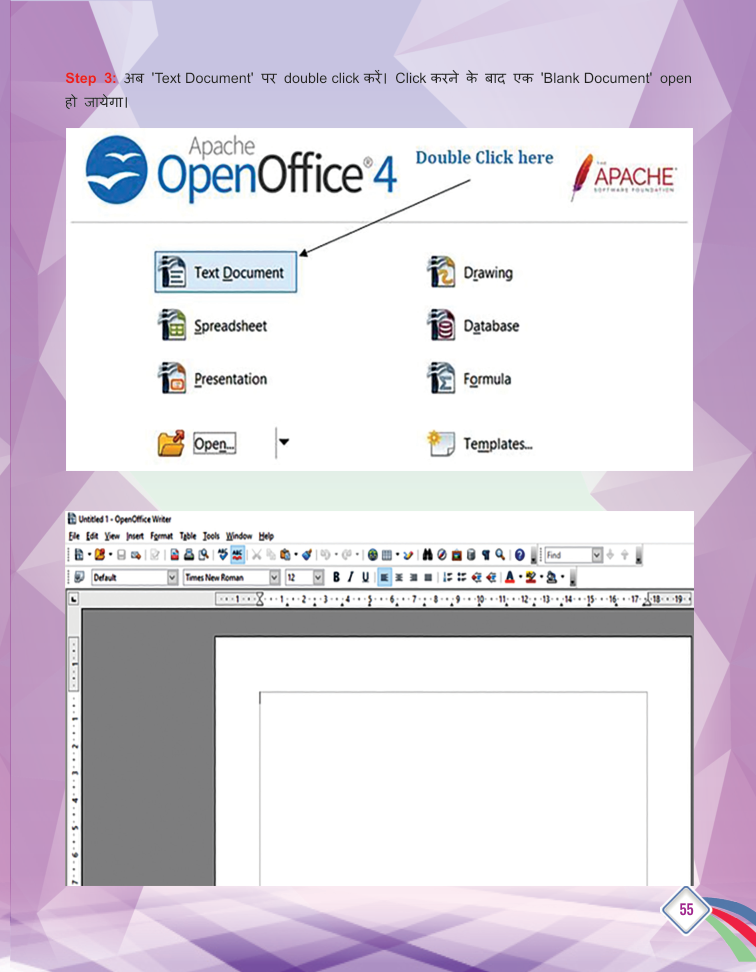
    Step 2: Double-click 'Text Document'.

  3. 3

    Step 3: A blank document opens - start typing.

  4. 4

    Step 4: Save the document in your folder.

03

Formatting Text

  1. 1

    Bold: Displays text in a darker, heavier form.

  2. 2

    Italic: Shows the text slightly tilted.

  3. 3

    Underline: Draws a line below the text.

Text Highlighting

  • Sets the background colour behind text.
  • Select the part of the text, then click the highlighting icon.
  • Text can be highlighted in many different colours.

Your turn

Try a quick challenge

Create a one-page notice for a classroom event. Give it a clear title, readable spacing and a final proofread.

Quick Revision

  • Word processor: creates and formats text documents.
  • Writer: OpenOffice's word processor.
  • Bold: darker/heavier text.
  • Italic: tilted text.
  • Underline: line below text.
  • Highlighting: background colour of text.

Conclusion: From letters to stories, the word processor is where our words take shape - type, format, and save.

Keep in mind

Quick recap

  • Draft first; revise meaning before polishing appearance.
  • Use formatting to guide the reader, not to decorate every line.
  • Save with a descriptive name and proofread before sharing.

Key Terms

Word Processor

वर्ड प्रोसेसर

Formatting

फॉर्मेटिंग

Spell Check

वर्तनी जांच

Find and Replace

खोज और बदलें

Document

दस्तावेज़